


🌡️ Non-Contact Infrared Thermometer for Home Use
A non-contact infrared thermometer provides a convenient way to check forehead temperature without placing the device directly against the skin. Its handheld design, digital display and simple control buttons make it practical for households, caregivers and family temperature monitoring.

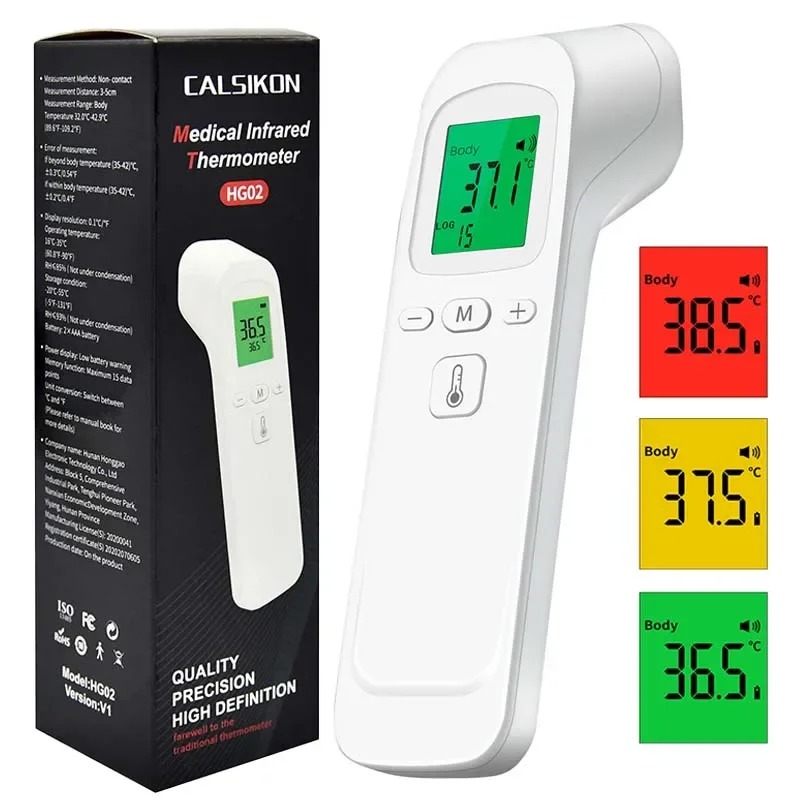
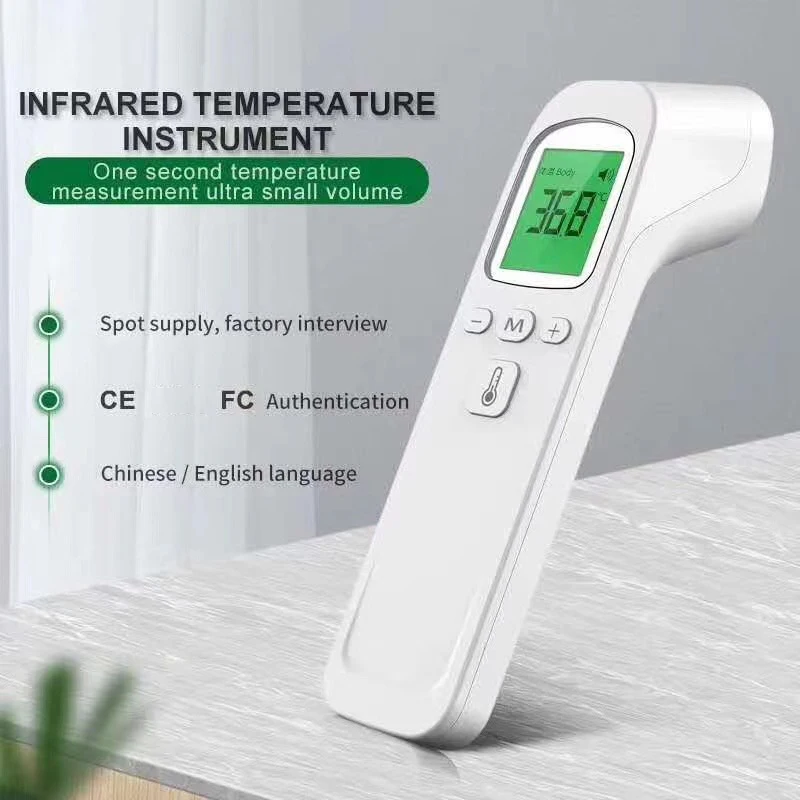
The supplier images show separate body and surface-temperature modes, a color-changing display, sound indication and memory controls. Exact accuracy, measuring distance, alarm thresholds and memory capacity must be confirmed from the supplied instruction manual before publication.
⚡ Quick Touch-Free Temperature Checks
The infrared sensor measures temperature from the forehead without requiring direct skin contact. This can make repeat measurements more convenient when caring for sleeping children or checking several household members.
- 🌡️ Infrared Measurement – Reads forehead temperature without direct skin contact
- ⚡ Fast Digital Reading – Displays the result shortly after measurement
- 👶 Family-Friendly Design – Suitable for supervised adult and child temperature checks
- 🧼 Reduced Contact – Makes cleaning between users more straightforward
- 🔁 Easy Repeat Testing – Allows another reading to be taken when confirmation is needed

The FDA notes that non-contact infrared thermometers are easy to use, provide rapid readings and may reduce cross-contamination. However, positioning, environment and incorrect use can affect results.
🚦 Color-Coded Digital Display
The supplier images show a backlit screen that changes between green, amber and red. This design can make the displayed reading easier to view, particularly in a dim room.
- 🟢 Green Display – Indicates one programmed temperature range
- 🟠 Amber Display – Indicates another programmed temperature range
- 🔴 Red Display – Provides a visible high-temperature alert
- 🔊 Sound Indicator – The screen shows an audible-alert symbol
- 🔢 Large Numbers – Makes the temperature reading easier to read

Do not publish exact color thresholds until they are confirmed in the product manual. Color indicators are guidance features and should not replace reviewing the actual numerical reading.
👤 Body and Surface Measurement Modes
The display images indicate that the thermometer can switch between body and surface-temperature settings.
👤 Body Mode
Body mode is intended for taking a forehead temperature according to the manufacturer’s positioning instructions.
- Suitable for intermittent forehead measurements
- Designed for supervised household use
- Provides a numerical temperature reading
- May support Celsius measurements
- Must be held at the specified distance from the forehead

📦 Surface Mode
Surface mode may be used to estimate the temperature of compatible objects or surfaces.
- 🍼 Check the exterior surface of a bottle
- 🛁 Estimate bathwater surface temperature
- 🥣 Check the outside of a food container
- 🌡️ Measure other household surfaces

Surface mode does not verify the internal temperature of milk, food or water. Always stir liquids thoroughly and use an appropriate food or liquid thermometer when an internal temperature is important.
🧠 Memory and Adjustable Controls
The thermometer includes M, plus and minus buttons, which appear to support stored readings and adjustable settings.
- 🧠 Memory Button – Review previously recorded measurements
- ➕➖ Adjustment Controls – Navigate or change available settings
- 🔊 Sound Settings – May allow audible alerts to be adjusted
- 🌡️ Mode Selection – Switch between supported measurement functions
- 📟 Clear LCD Screen – Displays mode, reading and available indicators

The precise memory capacity and configurable settings should be copied from the verified manual rather than estimated from the images.
✅ How to Take a Forehead Reading
- 🏠 Use the thermometer indoors in a draft-free area.
- ⏳ Allow the device to adjust to the room before use.
- 🧢 Remove hats, headbands or anything covering the forehead.
- 🧼 Ensure the forehead is clean and dry.
- 📐 Hold the sensor perpendicular to the forehead.
- ↔️ Use the exact measuring distance stated in the manual.
- 🌡️ Press the measurement button and wait for the reading.
- 🔁 Repeat the measurement if the result appears unexpected.

The FDA advises keeping the forehead unobstructed and dry, holding the sensor perpendicular to the forehead and following the device-specific measuring distance. Direct sunlight, drafts and incorrect positioning can produce inaccurate results.
🧽 Cleaning and Storage
- 🧼 Clean the thermometer according to the supplied instructions
- 💧 Do not immerse the device in water or cleaning liquid
- 👆 Avoid touching or scratching the infrared sensor
- 🌬️ Keep the sensor clean and dry
- ☀️ Store away from direct sunlight and excessive heat
- 🔋 Remove batteries before long-term storage when instructed





Reviews
There are no reviews yet.